This is site is about smartphones, tablets, PCs, Laptops, Operating Systems, Applications, and much more. Look for Android, iOS, and Windows News and updates.
Why on Earth do we need a 4K display in the palm of our hands? Is 4K displays an overkill altogether including the TVs and PC monitors and cameras that include 4K playback? Well according to Sony and its new announced smartphone (featured at IFA 2015 in Berlin, Germany). Its an push to limits of our images and video and more all for the best viewing possible. Some might say its to be the one that brags about their product has the only thing out that no one else has or to be the odd person at the party with the most expensive gadget. 4K on smartphones might help viewing in VRs better. Although, doubtful think anyone will see the difference. This phone has some insanely PPis! We are talking close to the 1,000 mark. Well sort of. The Xperia Z5 has about 802-806ppi density. Depending on the region. With only having a 3500 Mah batter built in this phone, you would think Sony would want get bigger and better than the Moto Droid Turbo and Galaxy Note 5. But, According to Sony, it will have "All day battery life". Seen in Hands-On videos, the Z5 4K display does look very nice and the 4K video quality is pretty good as well. This phone also comes with a 23MP rear camera that is suppose to be as good as the Galaxy Note 5 and S6 Edge+. But really havent seen or had any real time with the camera to confirm that statement. You would think mobile gaming would be awesome with the 4K display, but there aren't even games out now that are optimized for this kind of resolution. We know that Youtube and Netflix now accept 4K video playback, but what else out there would benefit from this 4K on a smartphone? Below will be just a few hands-on videos and footage of the World's First 4K display smartphone and you be the judge. Guess Sony wanted to try to outdo the big dogs.
Motorola X Style (Pure Edition) Photo By: Motorola
Moto X Style Pure Edition is all about being customized, carrier freedom, and having the pure experience of Android. You can show your own style by making the phone the way you want it. You can use the Moto Maker on the Moto X Style on the Motorola official website. This phone is beautiful from the inside and out. Motorola gives you the choice to choose your own carrier with having the phone unlocked. So you can choose any plan from any carrier and you have a working phone. For people that want to experience pure Android, Motorola is giving you that experience. Not just only the Nexus line, but now Motorola has jumped on board with the whole pure Android. You not find any skins or bloatware at all on this phone. No having carriers apps all over the phones and their branding. This will also allow your phone to run faster and smoother.
This phone comes with endless entertainment with a massive 5.7 inch QHD display and it comes with front facing stereo speakers. The Moto X Style also comes with a top notch 21MP camera that can keep up with the LG G4 and the Galaxy S6 phone cameras. It also brings 4K video capture. You can stay powered all day without having keep your phone charging on the computer or in an outlet With the newer improved Motorola TurboPower charging, you can get up to 10 hours extra of battery life in just about 15 minutes. Also another thing is that Motorola promises that the Moto X Style will get the latest updates much faster now and you can teach your phone how to work best for you. Using the Moto Assist it can react to how you live. Want your phone on mute when at home ? It will be notified that you have just came home and you want silence from calls, texts, and notifications. This can go with when you are at work, at a food place, at school, and so on. You can wake the screen just by waving your hand over the screen. This phone is so unique and different from the norms that we are so use to. With a price starting at just $399 off contract and unlocked, its well worth the money spent.
It seems this week is about Google. Earlier this week, Google had unveiled their new logos for the web, apps, and even their own Headquarters. They have also been a lot of major updates come into the Android apps. One noticiable is that iOS is now Androidwear's second home! So you can use a Moto 360 with an iPhone.
Now to the real big amazing and incredible news. Amazon and at Best Buy has slashed the price of each Nexus 6 model. Yes! You have heard right! The Nexus 6 is now at it lowest price ever! You can now purchase the Google Nexus 6 for $349.99 for the 32GB model in Blue or White and the 64GB model for $399.99! This is major! This is even cheaper than the OnePlus Two and even the new launched Moto X Style! So, make your pick... Which is it going to be? Nexus 6 is the best of the best that Android has to offer and now that it is very affordable compared to the LG G4, Galaxy S6, HTC One M9, and Note 5, how can you pass this up? This is also a hint that Amazon is trying to make room for the new next Nexus devices that are probably launching in just a couple more weeks!
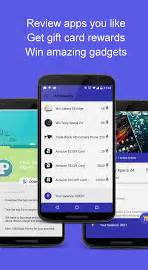
This is a app that lets you review other apps and earn Gift Cards and get a chance to win FREE prizes. Check this app out now and get a move on earning and reviewing. You may download it now on the Google Play Store. Click on the link below.
Hello to all my readers, viewers, and followers! I just heard some great news from one of the admins in the CM Community! My tech blog and YouTube videos will be featured in the CM Community group page and apps page on Android and iOS. This is a special thanks and a great opportunity for me as a tech blogger. I will continue to bring the most helpful tips and tricks to improve the mobile world in which we all can't live without. Thanks again. For those of you all that use the Clean Master apps, its great that you all love it.
Hello guys, I really haven't written anything about how I use my Android phone or even whats on my Android phone. So I am going to do that today. Instead of writing a long boring article about each single app and widget I use, I am going to show it through a video. Also I will have a short list of each app and widget and where you can download the app from. Now, these are all apps that can be used right from the Google Play Store without needing root access. Some are just in beta as well. So if you want donate to the developers of each beta app, you can do so through the Play Store. Also some have Pro and Premium versions of the free app. If you feel the free version doesn't satisfy you, then you can purchase the Pro version in the Google Play Store. So, no further ado, here is what on my Android phone. WHAT'S ON MY ANDROID (AUGUST 2015) VIDEO
MRU Widget stands for Most Recently Used widget. This app holds all of your most used apps in a box on a homescreen of your Android device. With this app, there would be no need to use the recent apps menu toggle. All of your used apps would be right in front of you. In the app settings of this application, you can blacklist apps that you do not want to show up in the widget box, range column count from 1-7, range row count from 1-5, change the application mode. and change the update rate on how fast you wan the app to update the box with most recent used apps. The widget looks very clean and smooth. You can even change the color of the fonts and background of the box. You can also change the size of the app icons from extra small to extra large. Customize it to your liking. There is also a pro version of this app as well that will let you do more than what the free has to offer. But, the free version alone can do a lot. You can check out some screen shots and videos below of what this app can do...
Pocket app itself has been out for some years now and is one of the most recommended apps for Android and iOS. This allows you to save articles, links, and even YouTube videos you want to read and watch later. You can also organize the files and links and videos the way you want to. You have a archive mode, my list mode, video mode, and favorites mode. In the new beta version, Pocket comes with just 2 main tabs from its homepage. One is the "My List" tab where your most recent saved articles and videos and links are and another tab is called "Recommended" tab, where Pocket predicts which articles and videos you might be interested in. Now if you are worried about this app collecting your data and information about your interest and habits, then you might not like this version of Pocket beta. Another reminder, that this app comes in handy for those of you that are on a data budget and need offline access for certain things. This app can work offline. In the video below will show you the latest version and the new features that comes with it. So are you using Pocket app? Leave your comments below...
The Notify application is fairly new app on the Google Play Store right now with just over 500+ downloads. Although it is still in beta form as you can tell from the image above. There isn't much to customize at all in the application. All you need to do is just make sure the app is turned on from within the settings menu and it should be good to go. One catch I may add if your in Android 5.0+, you need to download a app called "heads-off". This other app will disable your original app notification settings. In the screenshots and video below, you will see what the app can do once you have received any notifications from another app on your device. One more thing that you should is that this app does not require root access. No need to root your android device for this application to work and run smoothly. Which is always a plus for me in my books. So everyone with a android phone, give this application a try and let me know your thoughts. A full review coming soon.
Orbot is a free proxy app that empowers other apps to use the internet more securely. Orbot uses Tor to encrypt your Internet traffic and then hides it by bouncing through a series of computers around the world. Tor is free software and an open network that helps you defend against a form of network surveillance that threatens personal freedom and privacy, confidential business activities and relationships, and state security known as traffic analysis. Orbot is the only app that creates a truly private internet connection. As the New York Times writes, “when a communication arrives from Tor, you can never know where or whom it’s from.” Tor won the 2012 Electronic Frontier Foundation (EFF) Pioneer Award. To download app, click on the below... DOWNLOAD APP HERE
Bing Search Engine is getting to be very popular for most people. Although it isn't exactly like Google Search Engine, it can give you give information at your fingertips too. Not only that, but Bing will reward you for searching for things using its search engine. Now having Snapshot on Tap will earn you even faster points using your Android phone or tablet for mobile searches. The Snapshot on Tap is quite similar to Google's Now On Tap feature that is in Android 6.0. But Bing beat Google to spot by releasing their version today. All you have to do is download Bing Search app on the play store and browse the web and hold down the home button to activate the Bing feature and you will see what all information is related within the article or topic browsing. You get a pop up as shown the above picture. This function should be able to work with any app and in your texting apps as well. Test this new function out and see for yourself. There is also a hands-on video below. So, are you going to be using the Bing Search app more on Android or wait for the release of Google Now on Tap?
Google has released a new web version of Google Hangouts. In this video, I show how the setup looks on the new site. Leave comments below on your thoughts about the new google hangouts web site.
As you can see in the screenshot up above, it shows that I was on Sprint's Network today. The way this works is that if Google sees that one carrier signal is stronger than the other carrier signal in point in time, you will be switch to the better network within that area. So you won't lose connections at all. This would be the same way with the Wifi connection. When you are going from Wifi to LTE data, Google will allow you to keep connection while switching. This is just a minor update on my journey with Project Fi. If you have questions and concerns, please leave a comment on the page.
So Project Fi is out in the wild now. It is not a secret at all. For the past week I have been using the Google Wireless service aka Google Fi or Project Fi. It means the same thing. Recently I have seen my phone automatically connect to a Wifi hotspot in the area i was in that had public WiFi available. Sometimes you might have to get approval of use of the WiFi. But some won’t need you to accept. At times, you might say that is creepy. But Google promises that your data over the wifi is encrypted. If you feel it is unsafe, you can always go into settings to turn off automatically connect to Wifi. Now another thing I have noticed is that I was unable to tell whether or not if I was on T-Mobile’s Network or Sprint’s Network. The Network that appears when using your data is Fi Network. So Google sort of hides which Network you are using in between connections. But Google chooses the best network for you at that time and moment. That is also the same way when you are switching between WiFi to data network. For the past week, I have been getting very good signals in places I would not normally get great coverage with either T-Mobile or Sprint. Thats what Im really satisfied the most about with this service. The call quality and video quality was great. Haven’t paid my very first bill just yet, but I have monitored my data usage and really haven’t used a half an gig just yet. So, Im sure that I will be receiving some credit back. Even if it is just $5 or $10 back. That can go to my next bill. It seems that my battery life has boosted some even since I made the switch to Fi Network. While using the network I have tested gaming, videos, and music. Everything just seem to run and play smoothly while on the network. I must say, within just one week alone, I have never been more satisfied with data and Wifi connectivity the Google’s Project Fi on my Nexus 6. Although, this service isn’t for everyone, its definitely made for me. So, this is Project Fi: One Week Later.
So, I have been rolling with the Moto G as my main phone, but my Nexus 6 as my tablet. The Moto G is very good for what its worth! I only paid $179 for my version, which is the 1GB of RAM and 8GB of ROM. This is the low end model. It still holds up even after 1 week of usage. Haven't really test the water resistance part yet. But, my phone was splashed in the rain. But it was light, so that wasnt major. I watched YouTube videos and played some games with no issues at all. The phone is still responsive and fast as well. Yeah the screen is not the best, but it helps on the battery life. As I have been averaging over 5+ hours on-screen time. Most flagships cant hold a screen time that long! The Moto Assist and other functions come in handy almost everyday for me. I set my phone to go silent when Im in my car and to alert me when Im home. Also make it go silent when I go to sleep. It even tells to get rest now. Lol. What a smart device. I also like the twisting of the hand to open camera instead of swyping and pushing a button. It is fast to react to my hand motion as well. I did do demo of that and will place it below. I also like the chop of the hand motion for flashlight. You do the same motion to turn it off. I love that it has no bloatware or OEMs apps and stamping all over the device. More space to add apps and videos and pictures. But you can use up 4GB really fast. It has an SD card slot in the phone. So you can place a max up to 128GB. But I only placed a 16GB model in. As for now, its good enough. I like the moto display setting too. When I get an alert from a different app, the app icon appears first, then when you hold down on icon the notification appears and gives options to open the notification or just open the device to homescreen. Love that it has stock android as well. Much easier and simplicity. My first week with the new Moto G 2015 has been a great one. I also was able to get Project Fi to connect on it as well. The Moto G I have is a unlocked device that allows you to use T-Mobile sims and At&t sim cards in it. This may play a role in the fact that Project Fi uses T-Mobile as well. So maybe, this has something to do with it.
What is Project Fi, you asked? I'm glad you have asked this question. Project Fi makes it easy for you to experience wireless communication with some of the best leading carrier partners and the users, which are you, us.
THE NETWORK
Project Fi will use the newest and latest technologies to keep you staying connected in more places and over WiFi connections too.
You can tap into millions of WiFi Networks in the areas in which you are traveling or visiting to.
Usually, phones only are able to tap into one LTE or 4G network towers. But, with Project Fi, you'll be able to switch between two networks through their towers. With Project Fi, you are using T-Mobile and Sprint's networks. How does it work? Which ever one has the better signal in that particular at the time, you will be placed on that network. The same way with WiFi networks as well. So, if you have more strength of a signal with T-Mobile in your area, then you will be using T-Mobile's network. But, if you have stronger signal with Sprint, then Sprint will be the network of choice.
THE PLANS
Now, for some people, Google's Wireless plans are also competitive. With basics of Project Fi, your paying $20 a month for unlimited talk and text. Thats pretty decent compared to what others cost for just that. Now, here is where it might seem a little tricky for some. The data plans are as follows: $10 per 1GB. The max of data you can add to the plan is 10GB which would be a total for $100. Now wait before you all get upset and walk away from this article and call Google trash. Ok, so its 10 dollars per 1GB, right? Well, let say you want about 4GB of data plus the unlimited talk and text. With all that, you looking at roughly $60/month. Now to some, that could be over price and not competitive at all. With this phone service, its different. So you if you only use up 2GB out of 4GB, Google will credit you $20 back into your account for next time. So you are spending $40 for that one month you didn't use all of your data. If you are around. WiFi all the time, your data shouldn't drop as much. So, that is something to think about when it comes to this plan. Now me, myself, I choose 2GB. With T-Mobile, I never went over my data caps and I only averaged about 1.5GB-2.5GB of data. It really just varied on where I was at and located or what I was doing at the time. So my first month plan will cost me just $40 plus taxes. Which I have already checked and it was additional $4. And yes, Google does charge fees for using this service. It really varies where you live. Also, if you wanted to pause our plan, you can! Google just will credit you what you haven't used and credit it back. Then once you decide to start back, you will begin where you left off. Then if you dont want to use the service anymore at all, you can cancel at anytime.
WHAT COMES WITH PROJECT FI?
First things first. In order to use Google's Wireless Service, you must first sign up for the service. As of right now this is an invitation only program. So it may take a while before you get anything back from Google. Its the waiting processing thats the pain. The next thing... Some of you all might not like this. If you don't already, will need to purchase the Google Motorola Nexus 6 phone. For the 32GB model, it will cost $499.99 and for the 64GB model, it will cost $549.99. But, there might be some sweet deals on Amazon, EBay, and even Google Store right now, if you want look into it. But, I have seen videos where people with Project Fi had used the service with the Google Nexus 5, Galaxy S6 Edge, and even the iPhone 6 Plus! I have no idea, how all this is even possible if Google made the trial service specifically for the Nexus 6. But I will add some of these videos to the site in the future.
Project Fi Sim and Welcome Kit
Now, once you get the invite from Google about Project Fi, the next step is to place your order in. Now Google will ship you your own Sim card and also some great goodies! In the kit alone with the Sim card, you will receive a 6,000 Mah battery, a Nexus 6 phone case, and Project Fi earbuds. All just for accepting the invitation and signing up. While doing all of this, Google will ask you do you want to purchase a Nexus 6. You can say yes or no. Your next move after this is whether or not you want to use your current number and transfer it to Google's Wireless service or to create a new number. I chose to create a new number for it because it was fast and easy and I just chose not to pay the $20 fee to port my number over from T-Mobile to Google, even when I am still using T-Mobile through Google. But, get a number and then you are all set!
Now thats pretty much the run down of Google's Wireless Service, Project Fi!!! Are you interested? Is this something you might be into? Well, see it for yourself.
Today, Google announced the new major update for Android's Hangouts! All Android users may now update to the Version 4.0 which brings the match brings the material design and some more cool features. If you haven't received the update yet, there is a APK file for it on the official APK.mirror website. So you might want to go check that out as well. The google hangouts will no longer bring up "Unknown" when you are calling someone. So people will possibly pick up your call more so than never. Also has an update for the Android Wear app where you can say "Ok Google" and send a message from your Android Wear, if you so happen to stair down at your watch more often. There are more smaller changes and improvements. So, check your app section in the Play Store to see if you have gotten the biggest update possible. Will be bringing a full review soon. Click the link below to get the new update.
Textra comes with a simple, beautiful, and fast way to text! It has a new flat style emojis. The fixed firmware (4.4) issue that made Textra slow and often freeze with certain third party keyboard. It also came with some bug fixes. It even gives you protection from Stagefright! Video messages can contain an exploit called Stagefright that can harm your phone. Textra SMS protects by ensuring new video messages can not automatically run exploit. This app also has new smooth animations when going from conversation list to search screen. So this maybe the app to save most people for now until the carriers and companies come up with patch for Stagefright. So guys check this app out. It is now free on the Google Play Store.
TextNow is offering FREE unlimited calling this month for anyone on TextNow app right now. So if you like this new change from the Wireless company, please tell as many friends as you can about TextNow, rate with 5 stars, and they may extend it!
Note to everyone: Make sure you have the latest update of this app for these great offers and many more!
Checkpoint talks about the codename stagefright and in other words which is also known as Certifigate. This is the vulnerability that's going on right now in the Android world. You can get reports on this by downloading the free reports on the checkpoint official website. I'll leave a link below.