This is site is about smartphones, tablets, PCs, Laptops, Operating Systems, Applications, and much more. Look for Android, iOS, and Windows News and updates.
Tuesday, April 21, 2015
Google's Wireless Service Might Be Announced On April 22
There hasn't been much else said from Google about their new anticipated Wireless service since early March. But, according to the Wall Street Journal, Google is rumored to announce this service as soon as April 22. For those of you that dont know, Google is teaming up with Sprint and T-Mobileto give the consumers the ability to switch from either network depending on which out of the 2 signals is stronger than the other in a area. Google service is also to use Wifi networks for cells and data as well.
Google is also to allow its customers to only pay for what they have used. Sounds like a pretty sweet deal. Most carriers just want you to pay out a flat rate each month even if you don't use all of your data or minutes or text.
The only thing might run the customers away from this service is that you must own or buy a Nexus 6 smartphone. Atleast that is what the plan was originally set for.
As of now, all of this is just rumors. Not for sure or certain that Google will announce this service on April 22. While we also know that Google's I/O developer conference is right around the corner, having Google to make an announcement on April 22 will be a thrill to see and hear.
So, what do you all think about Google's new wireless service and its options? Is this all you would need to switch? Do you own a Nexus 6? Will you buy one now to get Google's service? Leave the comments below...
Friday, April 17, 2015
I Reached 300K+ Views on the Youtube Channel!
Hello everyone! I want to share another milestone with you all in my Youtube career! I have just now reached over 300,000 views! Now, I know that might now sound like a lot right now. But as time will go by and more content is added to my channel you will see the difference. I just want to thank you all again as my viewers, readers and subscribers. Thanks for your support! Because you all are a major part involved with my channel I want to giveaway some prizes! Yes, as a matter of fact, Im going to give away 2 prizes this time! One is a Samsung Galaxy S6 Spingen Case (Black Model) and a Google Nexus 6 Spingen Case (Clear Model). Here are the rules below:
CONTEST RULES
1) Must be a US citizen
2) You have to be a subscriber to my channel
3) Like the video from above in this article or click on it in the Youtube app
4) You must leave a comment on the video from above letting me know which Phone case you want to win!
I will announce my 2 winners on April 24th 2015 at 7PM on Youtube.
Before I go, once again I would like to thank all my subscribers, viewers, and readers! Thanks again. More to come from your next tech blogger!
Hidden Games Within Android Lollipop!
Google and Android have a lot of hidden items and objects and apps that all surprise us. But did you know that Google inputted a hidden game right into the latest OS which is Android 5.0 and 5.1? It is the lollipop game/Flappy Bird. Anyone with the latest OS can play this game at anytime they want and of course it is free. It is right in your system. But there are some steps into getting to it.
Steps
Go to your system settings.
Hit About Phone tab.
Click on your Adroid Version
Tap the lollipop to many colors.
Hold down in middle of the lollipop until you see the game.
You are ready to play.
Here is a clip of the game play. Watch Video Now.
Next is also a hidden game within the Chrome browser. Its the Dino game! Once you play it, it is very addictive as much as the Lollipop Edition of Flappy Birds. Now in order to unlock this game, you must first be offline. Then, your next step is to open your chrome browser and act like you are trying to search for something. But you are offline. Then an error page will appear with a Dinosaur on it. Your next step is to push it and the game begins. See below for the game footage. I hope this article was very helpful. Hope these games will save you time and storage spaces on your Android devices. Let me know how your experience is with these games and if you found it easy to unlock or hard.
Google Drive on Android Has a Hidden Feature... Your Apps!
Hello everyone again! It is just one of those days where its Google Time! Today, I was just going through my Google Drive scrolling away and notice that I am on FULL with my Drive storage! Oh No! Not to worry, I figured out why I was on full and will get to deleting as soon as I can. But, that is not the only thing I am here to discuss with you all. I also notice as I was scrolling across the middle of the app, I seen the Google toolbar (at least that is what I call it). The same black bar you see on your Chrome browser. I seen tabs that read my Google plus name, Search, Images, Play, Gmail, Youtube, and More. I touched where my G+ display was located and seen my notifications appear and I was amazed! You can view your Google+ notifications and comments right inside the Google Drive application! That is freaking awesome! I would have never known that at all if I hadn't come to my storage options. Plus, there is more. You can also open your Youtube app, Google Play, Gmail and even Maps app right from the Google Drive app! Whether you feel this is a hidden feature or not, I truly believe this is something that is very useful when you are in a multitasking mood. It may not WOW everyone, but I am sure you all are going to love this in many ways than I can imagine. So guys tell me what do you all think about this? Is it a hit or miss? You know what to do. Drop those comments down below...
The Google Handwriting Input App
A couple of days ago, Google somewhat quietly released a handwriting tool app called "Google Handwriting Input" application on the play store. This app will allow you to handwrite almost anything. From your messages, to emails, to note taking. Instead of typing, swyping, or voice input, you are now able to use your own handwriting to input into words. Now, if you don't have very good handwriting, you are not alone. The application will auto correct your writing. This app also includes over 82 different languages for inputs. You can even draw out you ejimos and symbols as well. Below in the videos will show you hands on on how to use this app on your Android device and how to setup the app as well. If you have this application, tell me what do you think about this app so far? Is it coming in handy for you now than ever before? Why do you think it took Google so long to release such an app? Thanks for your reading and viewing.
Google Handwriting Input App Review
Google Handwriting Input App Hands-on Video
Tuesday, April 14, 2015
LG G2 and the Nexus 4 Both Get Android 5.1!
More news! The LG G2 from T-Mobile and At&t is now receiving the Android 5.1 as well. So guys, if you are on the T-Mobile and At&t and have LG G2, make sure to check your updates for the OTA.
If you all have the Android 5.1, what do you all like about it and what you don't like. Leave a comment below.
Follow this link below to see what comes with the Android 5.1:
http://itechuout.blogspot.com/2015/03/android-51-update-is-now.html
Friday, April 10, 2015
Why Does the Nexus 6 Reboots Itself?
Hello everyone, for my Nexus 6 users, have you ever wonder why does the Nexus 6 always reboot itself, or freeze up, or even always stops responding? There are a lot of factors that can be apart of this puzzle. While there are so many problems to the big issue, there are also some solutions they help you figure it out. Below are just a few suggestions that may help solve the problem of the Nexus 6 always rebooting itself and any other minor issue.
1) TOO MANY APPS!
Yes, I myself am a app lover and hoarder of them as well. One problem could be that you have a lot apps on board on the device. Is it possible that you are probably using all of the apps that are installed and downloaded to the device? Yes, you might be using all of them, but are you using all the apps on the daily basis? You can check which apps that suck up the most RAM and internal storage by going to your settings and selecting Apps tab.
.
Sometimes we may miss a app running in the background. In Android 5.0, the most recent tabs area sometimes doesn't all the time remove your most recent apps from the section. So, just take a double look and remove apps. Sometimes even a random app will appear in the recent tabs that you haven't even recently used! Thats Android! Just swype it to the left or right and then its gone.
This is a problem too. Even though you all may not see it like this, but you'll see the difference once the apps are disabled or deleted. So, the apps that you do not use (3rd-party apps) you might want to uninstall the apps that aren't not being used at all and it will also give you more storage space back on your device as well. Since the Nexus 6 has no micro SD card slot and you can not remove the back cover.
2) SAFE MODE!
Another solution might be is to place your device into Safe Mode. When you use Safe Mode on your device, this may identify the apps that causing the device to trigger off glitches and freezes and force stops.
3) CLEAR DATA AND CACHE
Collecting a lot of data on your phone will cause your device to act weird and not work properly. You don't need all that data from your apps to be stored onto your device. So clear all data and cache.
Warning! Some apps may ask you to relogin again. So remember usernames and passwords.
4) FACTORY RESET
Hopefully you dont have to come down to this point. But if you have done all the other options mentioned above and your device is still rebooting on its own and not responding right away, then you are probably going to have to factory reset your device. Now, before you go ahead
and do so, make sure to backup any important data and information that you want to keep on file in your Google Account.
Hope these solutions were very helpful and useful to those of you with the Nexus 6. This may also help you as well with any Android smartphone and/or tablet. If you have any other suggestions, please leave them in the comments below and I will surely add them to the list as well.
Tuesday, April 7, 2015
NEXUS 6 One Month Later
Hello everybody, its me again with another incredible article! Now, I know just a little over a month ago I still rolling with the LG G Flex (gen 1). I'm sure you all remembered bashing every other phone out there including the Galaxies and the Notes when it came to the G Flex. Well, its time came and went. Besides, the G Flex was aging and I would've had to get another smartphone anyways. But, enough about what to that old phone I had. Lets talk about the one I been with for the last month!
NEXUS 6
The Nexus 6 is by Google and Motorola. Two of the most innovative tech companies and phone manufactures that are out. Now, you would think by having these two giants come together they are a beast! I mean sure, not all will like the 6 inch display or that it has 2K resolution. But, it is definitely a true phablet in my eyes. No need for a 7inch tablet. So, hey no tablet needed then. No removable battery, but I have been using the Moto Turbo charger. It works great. It gives me 6 hours of battery life extra when i need it. The 3GB of RAM and 32GB of ROM is more than enough for me to use this device. No, it doesn't have SD card slot to insert. No problem for me, I use my cloud accounts such as OneDrive, Google Drive and Dropbox. They are all secured and I can access them anytime, anywhere. So thats where all of my videos I record and photos are placed. In the clouds. The gaming and video picture quality are just great. I really don't see me upgrading to anything else. I have stock android and that it is a Nexus 6, so since it is a Google product, it would be one of the few to receive a Android OS update first. So, no worries in that department. Now, about the Android updates. As when I first purchase the Nexus 6, I really didnt get to play with Android 5.0. But, I do know it wasn't the best and yes it was very buggy and laggy and even slow at times. So glad I didn't live through that. Now with 5.0.1 update right out the box as soon as I had everything setup. Android 5.0.1 was just to pretty much fixed what 5.0 couldn't do. Andorid 5.0.1 wasn't bad at all from my experience with the nexus device. I mean sure, there were times a app didnt open and there were times a app crashed. Sometimes the Google Play Services error would appear on screen. Didn't say that the phone or OS was perfect. No, it will never be perfect. If that would make the case, then even iOS users would switch real quick! But that is not the case at all. For the most part, it can do what it is set out to do. A little over a week ago, I have received one of the biggest updates of the year for Android and the Nexus 6, Android 5.1. Now Android 5.1 adds more options for alarm toggling in the quick settings for priority settings and Wifi and bluetooth options as well. Now you dont have to go through the manual settings just to switch Wifi connections or bluetooh. You switch right from your quick settings mode. You also get animation with portrait and auto-rotate mode. There were also some more bug fixes and minor improvements as well. But a couple of days ago, my phone did stop responding due to the UI not responding. But I let it play it out and then the phone back to work. I dont know if that had to do anything with the update or a particular app. So I downloaded the Device Assist app from Google for the Nexus, GPE (google play edition), and the android one devices. According to the app, my Nexus 6 is doing good. Which I think is pretty odd, if the UI had stopped responded. No worries now, because it is working just find.
MY THOUGHTS
After one month of owning the Nexus 6 aka Moto X Nexus, I find this phone to be the BEST out behind the S6 and M9, because fanboys of the galaxies will get their voices heard first. But, its about what I like now and how I feel. The Nexus 6 has stock android. You really can't go wrong with stock and it also has Google Now Launcher included on board with the phone. It has all of your favorite Google apps and no BLOATWARE. So plenty of memory with my 32GB model. It had 25GB available storage and I still have 23GB of storage left. Plus my cloud storage. 2K display is very nice. Not as great as the Note 4's due to Super AMOLED VS AMOLED. You'll have to see the difference in person. The camera I forgot to mention is better than what I heard. With my experiences and photoshots, the picture quality came out great and the 4K video is decent. It isn't the best. I'll give it that. The battery life is average and with the Moto charger, it helps out. This phone has almost been out for 6 months now on the market. I still would recommend this device. I would definitely keep the Nexus in the top 10 and even in the top 5 smartphones for 2014-2015. So, there you all have it. My take on the Nexus 6. What are your thoughts on the Motorola X Nexus? Leave the comments below.
How I Made My iPod Touch 5G Into a iPhone!
I will bring up iOS every now and then. But not too often. I actually do like the iPhone 6 and iPhone 6 Plus. Apple went out of their way to keep up with the Androids in the world such as Nexus, LG, HTC, and of course Samsung. But enough of all the blah blah. In the image above, you see that that is not an iPhone. No? No, is correct. It is an iPod Touch 5G 32GB model to be exact. The reason why I am mentioning the iPod Touch now is for even so long that Apple has still have the 5G and no 6G announced. The 5G 16GB model only cost $179.99 every now and then. While the 32GB is $239 and 64GB is usually $299. Well, you still can download all the great iOS apps and Google and even Microsoft apps as well on the iPod Touch. You can still use iMessage and even FaceTime just an iPhone can. The main difference is that iPhone has data network from several carriers and Wifi, while the iPod Touch only has Wifi. Well, actually there are ways you can give your iPod Touch a data connection as well as wifi. You can use a device called the iPod Touch Sleeve or a mobile Hotspot that uses a data network connection. Not just wifi, but also data. One particular company is called Freedompop. I have mentioned FreedomPop several times in my posts and articles. So for the new viewers and and readers, I will make this simple. FreedomPop is a company that promises its consumers FREE Internet and Phone service for life! Yes, you all heard me right, Freedompop delivers Free texting, calling, and even data. Well, to a limit at the least. For those that dont do too much talking and texting, you get 200 minutes and 500 texts for the free. With data you get 500MB per month for the free. If you around wifi all the time, this won't even touch your wallets! Plus, there are a lot of ways to communicate with family and friends now. You have iMessage, FaceTime, Facebook and it messenger, Skype, and even Hangouts. All have free calls, texts, and video message. So with the Freedompop iPod Touch Sleeve or their 4G hotspot, you won't go wrong. You'll be free from any contracts and being stuck with a high bill. This all would be free for life once you pay for your devices. But, other than that, that would be it. Just think about all the money you would be saving by just doing this? Well, I have my iPhone. I don't have to pay anything anymore. Oh, yes, you can also do this as well with the Android smartphones. Freedompop Apps are now available on the app store and google play store. So, guys what do you think about all of this? Is it a hit or miss? You all can leave those comments below.
My iPod Touch homescreen. The Freedompop Text and Calling app in left corner of the screen.
HBO NOW is out on Apple TV and iOS Devices
HBO NOW available on iPhone, iPod Touch, iPad, and Apple TV
A month ago, Apple and HBO had announced this great partnership. HBO app was coming to iOS and the Apple TV. Unfortunately, this is a exclusive deal only. So if you do not have a Apple device such as the Apple TV or iPad or iPhone, then you are out of luck. This will be great for on the go and for people that do not use cable or DirecTV. Maybe this will be the break out of the quote "Cut the Cord" or "Cut the Cable". Now with the HBO Now, all you would need to watch it is internet access or Data such as 4G and LTE. There is a subscription for this great app. You sign up first, if you haven't already, then you try it out for 30 days. After your 30 days are up, then you will be paying $14.99 per month for HBO. For this and the price, do you think it is worth it? Is this enough for you to stop paying for cable and DirecTV? Do you already not have NetFlix, Hulu and Crackle accounts to watch all the movies and best originals? What about the Amazon users, Androids, and Windows users? How do you all feel about the HBO NOW being only available on iOS and Apple TV? I'm sure you all have a lot to say about Apple and HBO. Well, don't just sit there. Drop them comments below!
Clean Master App Drawer and App Folders
For those of you that may not know of Clean Master app and Cheetah Mobile. They have some cool neat apps and hidden features within these apps. Now, the images that are shown (above and below) give you a little sneak peak of what it looks like and what they do. The App folders organizes your applications by categories. For instance, Books and News apps in one folder, games, then you have your media such as music, movies, and TV shows apps in another one. It also even comes with its own app drawer as well. It will even show you apps that users are even using near by based upon your location shown at the bottom of the app folder when opened (Shown below). All of your apps will be in alphabet equal order from A-Z. I must say its a neat feature and function within the Clean Master application developed by Cheetah Mobile. The folders also boost load time up to 30% for each app. It will even boost your load times on games. I demo this in a upcoming video. So keep posted and up to date from this site. More to come. So what do you all think about these features and functions? Have you tried out the Clean Master application? If not, you can download it now for free on the Google Play Store.
(CM app folder opened showing all related apps including apps people use nearby)
(The All Apps box allows you to get to all of your apps in Alphabet order and also shows most recent apps used as well)
Device Assist App by Google Inc
This app provides you with tips and tricks and troubleshooting to help you get the most out of your device.
Get help that will detect issues. Whether its your GPS, connectivity, battery, etc.
It will help you explore new features and improve the performance of your device.
For Nexus and Google Play Edition devices, you will gain easy access to live Google Support.
This app is available to Nexus, Google Play Edition and Android One devices that are running Android 5.0 lollipop or higher.
Saturday, April 4, 2015
Android 5.1 Is Out Now For The Nexus 6 with T-Mobile
My New Favorite Wallpaper!
Hello guys, I must admit, I am homescreen, app, and wallpaper hoarder. I love wallpapers! When I came across this image (seen on +Pocketnow), I just had to save image and download it and set it as my homescreen background. Dont mind my apps. There are very messy in the image above. But are you a hoarder for when it comes your smartphones and tablets? Please, leave comments and thoughts below.
Friday, April 3, 2015
Yahoo Weather App
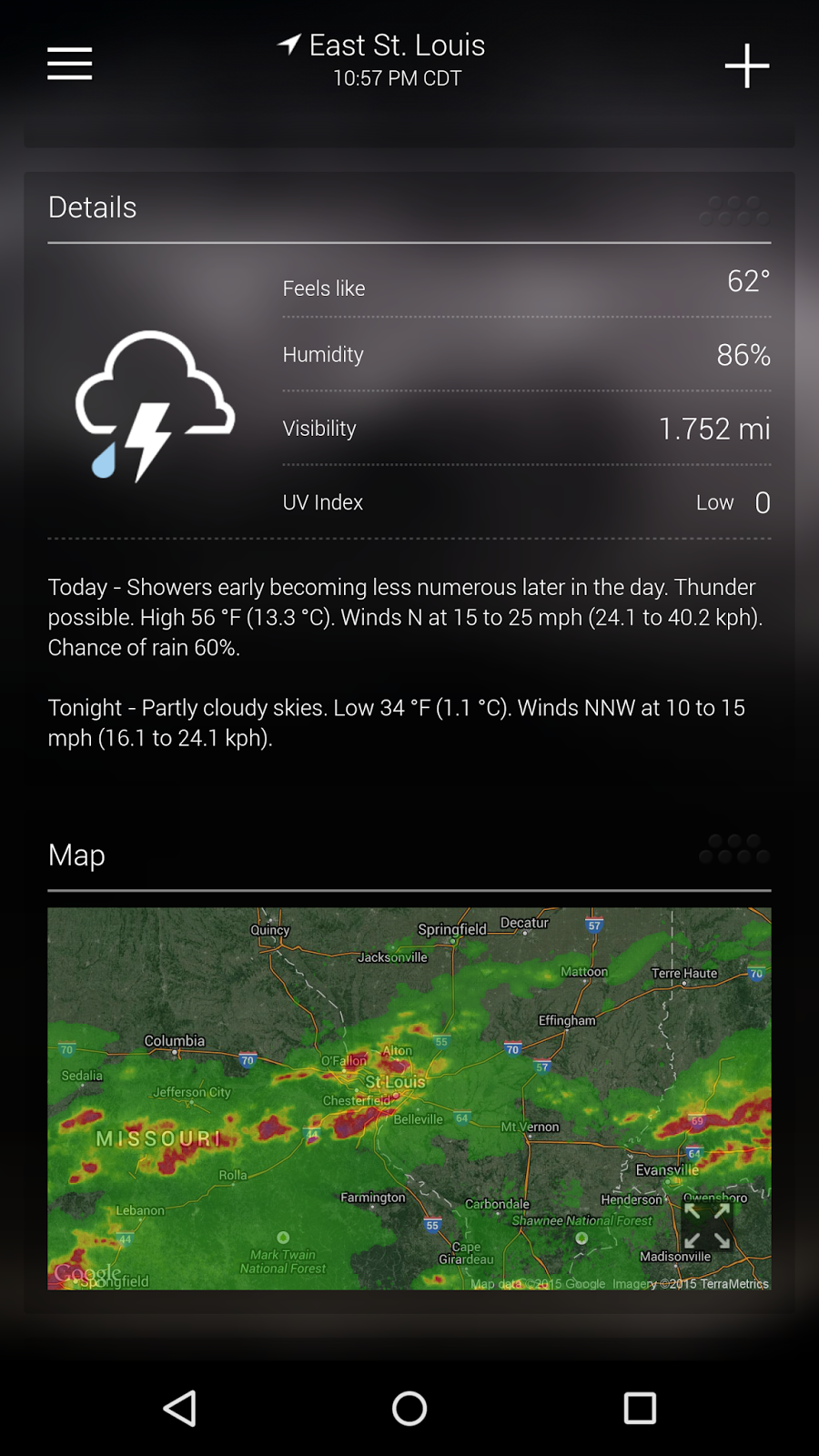
The yahoo Weather app is one of the best, if not the best, to keep you posted about the latest weather updates in your area and even near by. You can even search other locations and see what the weather is like in other places as well. It shows hour to hour stats, 5 day forecast, and even 10 day forecast. You can even see the current weather conditions right the mini radar Map in the app itself. Plus, there are plenty of different widgets you can use to place on your homescreen of your Android device, weather its a smartphone or tablet. I definitely would recommend this app for anyone that wants to keep track of incoming weather for today, tomorrow, and even 10 days from now. So what is your favorite weather app and why? Have you downloaded the Yahoo Weather app yet? Well maybe you should. Leave comments below. Thanks!
CM Lock Screen
Hello everyone, I would like to share with you all a great looking lock screen that you can find on the Clean Master (Speed Boost) app. It shows the percentage of the battery charge, time and date, the time it will take the batter to charge and even some most recent news tabs at the bottom, and you can even scroll through the news feed and ads as well. I say it can be very helpful to others at times that want to see what is going on from a glance just by looking at the lock screen. Ok, so what are your thoughts on these neat features from Clean Master and Cheetah Mobile. Is it worth the try? Leave all comments below.
Saturday, March 14, 2015
Android 5.1 Update Is Now
Ok guys, so there has been a lot of dirt thrown at Google about Lollipop 5.0. Why haven't a lot of high end devices been receiving the update at normal rate or maybe why 5.0 had so many issues and problems. A lot of carriers have been slow to release just the Android 5.0 to their phones such as the Galaxy S5s, S4s, Note 4s, M8s, and M7s. But not to worry as those devices are finally getting to see the Lollipop update (after about 4 months being available). But, not to worry as Android 5.1 has been released in the wild. Now for those that do not know about how the Android updates work, Google usually only let their Nexus line of devices receive the Android updates because its pure stock android and Nexus is by Google. The devices that will receive Android 5.1 update first will be the Nexus 4, 5, 6, 7, 9, and 10 devices. As recent reports stated that Verizon's Nexus 6 will launch with Android 5.1 on device already. The Verizon's Nexus 6 will be available to purchase next week. There are also other carriers right now including Google Store already have the Nexus 6 available if you don't want to wait a few more days. So, now that is out of the way, let us take a look at what we will be getting from the latest Android Lollipop update.
Dual Sim
Dual Sim capabilities will be available for the Android 5.1. Which means if you or more than one other person will be using the same phone, you can keep your information protected, plus you'll be able to use more than one carrier sim card such as T-Mobile and At&t. This will also come in handy for traveling as well in parts that do not have a particular service or good signal for one or the other.
Device Protection
The Device Protection, when a lost or stolen device remains lock until you sign in to your Google account. This is a new feature that is available on most android devices shipped with 5.1 in addition to the Nexus 6 and 9.
HD Voice
HD voice is already available on the T-Mobile phones, but this is coming to other carriers as well such as Verizon Wireless. HD voice improves on voice improvements and enhancements. But who talks on phones today anyway?
Quick Settings!
Yes! What we all been waiting for in the Lollipop updates, There are quite a few improvements in the quick settings menu. Now, instead of having to go all the way through the settings app to pair your bluetooth and wifi, you can now control it all from the status bar drop down menu.
As you can see from the list, there is a lot to be rooting for or even looking forward to as your android devices get hyped for the Android 5.1 update. But one thing that seems to puzzle me about the whole Lollipop upgrade and updates, where is the SILENT MODE! For goodness sake, Google, please bring back the Silent Mode in 5.1.1 at least, maybe.
Based on what you see here and everywhere else, what are the android fans mostly excited for? Do you have a Nexus device? Are these enhancements worth the wait? Please drop all of your comments below.
iOS 8.2 Update List
Hello everyone, below is a list of improvements and enhancements and changes that you can find in the new iOS 8.2 Update for iPhones and iPads.
- Apple Watch Support
- Apple Watch App
- iPhone 5 or Later
- Health App Improvements
- Stability Enhancements includes
- Maps
- Music
- Voice over reliability
- Connectivity with iPhone Hearing Aids
Bug Fixes
- Maps
- iTunes Purchases
- Music
- Call Audio with Siri
- Bluetooth Calling
- Timezone calendar events
- Fixes Certificate Error
- Calendar Event Automatically
- Show busy events
APPLE WORLD and iOS 8.2 update
![]() |
| Tim Cook on Stage from Apple Watch Event 2015 |
This week was Apple's week! A lot came out of the Apple watch event today. So we know what the apple watch can do and how much it cost. So from what you all seen by the watch. Also there was an announcement for retina displays in the Macbooks. They also will have another upgrade chipset in their macbook airs and pro lines as well. We also seen the new USB C-Type which was shown in the new Macbooks. This new USB is to be way powerful and more superior than the rest that is out there to date. But, it is brand new to the market. More information coming soon. Along with the Apple Watch and Macbooks, there was also an OS update to iOS. IOS 8.2 is now available to upgrade your iphones and iPads with and is suppose to be compatible with the new Apple Watch as well once the Watch is released to the consumers. This week also brought an announcement from the CEO of HBO. Starting in April, HBONOW will launch and release for the iPhone, iPads, and the Apple TV. Now, some reports were suggesting that the HBONOW would be on free trial for 1 month, then after would be $14.99, while the CEO of HBO had later said 3 months of free trial and then 14.99 a month. Either way, it looks like the Internet might be taking over your livingroom and everywhere else. So with all the news and announcements, which ones were you excited about and not so excited for? Please leave your comments below. Thanks
Sunday, March 8, 2015
NEXUS 6 FOR 24 HOURS
So with the old and in with the new. Well, sort of new. Yes, I have given up on the LG G Flex in trade of the Motorola and Google's Nexus 6. Now, you might be wondering for a guy that was so moved on what the LG G Flex had to offer at the time of owning one, makes you think why I gave up on it so soon or so late. But, the truth of the matter is that the G Flex is starting to age. Its about a year and a half since it first released back in 2013. Its been that long. But, I have always wanted to stay up with the curve in hardware and software when it comes to the Android ecosystem. What other way to do that if I can grab me a Nexus device, especially one of the latest and most recent ones. So, I did, I traded my G Flex in and I purchased the Nexus 6. Now, lets talk about the Nexus 6 for a minute. The Nexus 6 is the by far most pure and premium Android smartphone you can have right now. Yeah, you have the G3, S5, and Note 4 and now G Flex 2. But the Nexus is pure stock android and out the box with the latest OS Android lollipop 5.0. I know that the new announced S6 and M9 will also come with the Android 5.0 Lollipop as well. But that is besides the point. The Nexus 6 is a 6 inch screen with beauty! It has a 2560x1440 resolution, 13MP OIS camera, 2MP front facing, front facing speakers, Snapdragon 805, 3GB of RAM and up to 64GB of internal memory. But if you are worried about memory, you have other options to choose from such as cloud storage. Now, I know some of you all don't believe in the clouds or put your trust in them. But Microsoft's One Drive gives you 100GB of cloud storage for just using the bing search engine and Google gives you 2GB of Cloud storage for checking your Google account security. So that put together is 102GB of storage added to your device. No need for an SD card. Also, there isn't a removable battery either here on this Nexus 6. Starting to see a pattern here (iphone). The Nexus 6 battery is a 3220 Mah and included with the Nexus 6, you will get the Motorola Turbo Charger. This charger will boost your power in 15 minutes and you will get an extra 6 hours of talk time. So that is more than enough power and memory. Nexus 6 is not loaded with any bloatware. What this means is that there are no apps pre-loaded onto the device that you can not uninstall or disable. Especially apps that are from your carrier or apps that come with the Galaxy, HTC One, LGs, and Sony phones, just to name a few. This is pure Google and Android. So you will probably have a little more memory on the Nexus phones than you would with the Galaxies and the Ones. The Nexus 6 is by far one of the best phones you can buy right now. If you are wanting to stay ahead of the curve and look stylish at the same time, then the Nexus 6 phone is for you. If you feel your phone should have the most up to date software, then the Nexus 6 is for you. If you like Motorola and Google, then the Nexus 6 is for you. I just mentioned a lot of great things about the Nexus 6 and why you all should have one if you are using Android. Google and Motorola has done an awesome job with this device. I definitely recommend this phone to everyone and anyone. My last 24 hours with this device has been amazing. The display is stunning, watching my Google Paly Movies has been a blast. Listening to my music with the 2 front facing speakers and watching Youtube videos as well has been a great experience. Surfing the web, texting, and phone calls have never felt better. I am able to do things and get things done in a timely matter without slow downs or lags. The Material Designs help color coordinate much better. Notifications swype away at ease. So far life is Good with the Nexus 6. Also after the break you can check out my Nexus 6 Unboxing video on Youtube. You may subscribe now, if you haven't so already.
If you would like me to share anything else with my readers and viewers about this device, please let me know in the comments below.
Thursday, March 5, 2015
Google's Phone Service Is Only For the Nexus 6 Phone

Google was at MWC this week and the exec Sundar Pichai did confirm the rumors of the company planning to launch their own phone service sometime soon. But according to report claim from Wall Street Journal, this phone service might only be available right now with the latest Nexus phone the Nexus 6 which was a collaboration with Motorola Mobility which has now joined forces with the China company Lenovo. Unfortunately, Google phone service will not work with the older Nexus devices such as the Nexus 5 or 4. This service will allow users to use cellular and WiFi connections with the cell networks of Sprint and T-Mobile for service. So what do you all think of this move and rumors from Google? Are you all interested for the new service? Are you now planning to get a Nexus 6? Does it matter if T-Mobile or Sprint networks are even included? Leave all comments down below. Share your thoughts.
Monday, March 2, 2015
Samsung Galaxy S6 Phone Case from Spingen Inc
Today, I received a special delivery in the mail today! An official Samsung Galaxy S6 phone case from Spingen Inc. The Samsung Galaxy S6 phone was just unveiled yesterday at MWC 2015, it not out yet. But at least you get a tastes a glimpse of some of the phone cases that are available today for purchase. This phone case I do have an unboxing and hands on video for right now on my youtube channel. This phone case is all black and will protect the back of the Galaxy S6. So you won't have to worry about the fingerprint collection on your phone. So guys, base on the Samsung Galaxy S6 Unboxings and Hands-On videos seen thus far, what do you all think about the phones? Are you pre-ordering one? Do you want one even? Leave all comments below!
Friday, February 27, 2015
The Galaxy S6 and S6 Edge are REAL!
Thursday, February 19, 2015
Where Does Your Data Go?
It seems that data is everywhere these days. Data on the left, data on the right. Data right in front of you, and data is behind you. We really at times can't keep up with where is all of our data going to and coming from. So next, we are going to be covering some tips and tricks on where to look for your data and how to keep track of your data. Your data is usually being sucked up through your applications on your mobile devices and your sites you visit on your browsers. There are also applications that you can download in app stores as well to help you view and monitor your data. Lets take a look and read some of these things.
There are many ways of how to check and track your data for your mobile devices. Lets take a look at some of the steps and directions.
When using some android devices, the fastest way to check your data usage is through going to your settings, then looking for your data usage tab or your mobile data network tab. You will select these options and then you will see which apps and programs and even broswers are using up data and that are not using your data.
When wanting to know what sites are using up the most data on your browsers on your mobile devices and PCs, using chrome for instancesv, you select your internet settings in browser, then selectt data usage, and then you will find your most recent sites viewed and how much data is being used up to view that particular site. Your data browser information and settings also gives you the option for you to delete or clear your data usage out of browsers.
The apps. Yes, there are apps as well to keep up with your usage and to track where all of your data is going as well. But most cell phone carriers usually includes this partiular app on their services and plans and you can even check from your online accounts as well for your phone services and plans. Even with your Internet modems and mobile hotspots as well. You would hope to think that your carriers will send text alerts or notify you via text or email alerts. But, just in they don't or maybe some consumers aren't knowing about this such thing, one app I would recommend for anyone to install onto their Android mobile devices, rather its a smartphone or tablet, is the Onavo Count app. This application allows you to setup the amount of data which get each month from carrier and set up your start and end date of when your data is up. Then it asks you how much you have used up so far to keep the app running accurately. Make the app a homescreen widget on your device so you will know exatly how much data you have used and how much you have left. It will also show apps and browsers and other programs as well that are using up your data. It even gives you tips on how to save your data. You may download this app now for free. Check it out on the Google Play Store.
So, there you have it. These are just some ways you can check your data usage on your mobile devices through your applications and browsers also. If you feel your apps are taking up or using too much data, you can clear the data from the apps in the settings menu. This also goes for the same thing in your browser settings. Screenshots will be shown as well. How To video coming soon... Please leave a comment on your thoughts and any other information you would like to share related to this article below.
7 Tips On Keeping Your Privacy Safe Online
How to protect yourself online and offline
Make strong passwords. These passwords need to be at least 8 words or digits long. Try not to include symbols. Mainly letters and numbers. These passwords should not start off with abc, or 123, or password. Make sure they have nothing to deal with you.
Remember your usernames and passwords. Try not to save your passwords and usernames on your browsers or even computers unless they are pin protected and password protected. Or just create a password journal or diary and have a lock.
Turn off save passwords mode. In any browsing setting you will always find that save passwords mode is usually checked. Just turn it off and make sure you have saved and updated your settings so that your password wont ever reappear unless you input it into computer or program.
Turn off Autofill. You can also unmark this option in the internet browsing settings. Make sure your browsers forget all your information.
Turn on Do Not Track. In order for these ads not know what you interested in and websites visited, turn on Do Not Track option.
Disconnect from Internet. This could be the most important thing. Disconnect from your data, wifi and router. No one knows whats going on in your browser if you are completely offline and not connected. This also goes for bluetooth connectivity and as well as GPS signals also if on Tablets and Smartphones too.
Clear History. Your browsers usually remember what website you visit last. So you might want to check your history and delete all history.
New Internet Private Mode. You can also keep your information safe from cyber attackers and hackers and even family and friends by using the Browser Private Mode. This mode won't save any of your data or inputs. Once you have exit the browser, all of your data and inputs will go away and won't reappear until you do so.
Bonus:
My bonus tip and trick. This can help you on battery life as well too for any device. If you are not using that particular device at any time, turn off the device all the way. Make sure your device is shutdown and Not in Sleep Mode.
Thanks for reading. If you would like me to add some more, please leave your comments below.
Tuesday, February 10, 2015
You Can Use your Android Devices as a 2nd Screen for PC or Mac
Hello everyone, im here again to save you some time, effort, amd money! You can do so many things with your android device like turn it into a game console, movie player and even a mp3 player. If you have an old one laying around the house or even your daily driver. You can even use your android device as a 2nd screen for your PC and Mac. There are plenty of applicstions out there that can mirror your PC screen. But not many can make your device into an optional display. So below in the video link, i demostrate one application that makes it possible. Check out my video below. If i was helpful, feel free to hit the like button and share with your family and friends. Thanks!
How To Make your Tablet 2nd display for Mac or PC: http://youtu.be/O8YYUwdJEJQ
You Can Use a Smartphone as a mini PC
Check out the video below to find out how to make your Smartphone a actual PC.
make your Smartphone a PC!: http://youtu.be/G4z4sTTC4Mo
Wednesday, January 28, 2015
FREE internet at HOME! The Hub Burst from Freedompop
This a router that requires no installation. Just plug in and connect all your devices via wi-fi or ethernet cable. Its from FreedomPop. The best plans that are offered are shown below.
Plans:
FATEST 5GB
17.99
Up to 12MPS
Best used for photo sharing, gaming, and video streaming
BASIC PLAN
11.99 5GB
Up to 1.5 Mbps
Best for web surfing, emailing, and facebook
1GB Plan
Best for web surfing and email
Free Plan!
Now is this enough for you to switch from At&t and Verizon home internet services?
Leave all comments below.
ZTE Force Smartphone on Freedompop now $99.99
The ZTE Force on Freedompop.
Cost $99.99
Specs:
CPU Speed 1.5 GHz Dual-Core Krait
Memory ROM 4GB Internal Memory
Camera 5 megapixel
Connectivity Bluetooth(c) 4.0, WiFi 802.11 b/g/n, MicroUSB v2, micro SD(c)
Battery Li-Ion 1730 mAh battery
Here below are the plans you can get with the phone on freedompop
PLANS:
1s month trial
unlimited talk and text
500MB of data
saving 800 dollars per year
Unlimited talk and text with 500MB
79.99 annual per year
Basic Plan:
$0.00 a month
200 vocie minutes
500 text
500mb data
So based on these specs and features and plans, is the phone worth the 100 dollar price tag or no? All comments are welcomed below. Thanks.
Wednesday, January 21, 2015
FreedomPop Anniunced New Wifi Plan that only costs 4.95 per month
Tired of shelling out every month for an expensive 4G LTE contract? FreedomPop just announced a Wi-Fi-based alternative that’s as untraditional as it is enticing. For just $5 per month the company is offering access to a nationwide blanket of 10 million hotspots.
As you can see in the map shown, FreedomPop’s Wi-Fi network doesn’t exactly cover the entire country equally, but if you’re in a major metropolitan area there shouldn’t be any issues. The company tells TechCrunch that it’s new service is a valid option for roughly 120 million American residents. The Wi-Fi itself will work on multiple devices, simply requiring an app that’s available now for Android and coming soon to iOS.
The company says it partnered with number of chains including McDonalds, Starbucks, Burger King and Best Buy. If you’re in range of one of these stores, you’ll connect to the Wi-Fi automatically. If not, you can always use one of FreedomPop’s data plans, which offer up to 500MB of cellular data, 500 texts and 200 minutes of calling per month for free. That may not sound like a lot, but if you’re always connected to Wi-Fi it may actually be more than you need.
Monday, January 19, 2015
You want to be cable free? Heres how
For some time now, there have been different types of ways to watch TV. You have Computers that have streaming applications, TVs with built in Wifi for your Netflix and Hulu Plus. You have your internet boxes such as Roku, Chromecast, and Apple TV box. You even can watch movies and TV shows right from your tablet and smartphones via app stores. But this is all true, then why are so many consumers still paying for cable and satellite TV? Check out my video below as I explain my thoughts on saying "No to cable" and "Cut the cable bill".
How To Cut the cable bill: Dwight Vlog 3: http://youtu.be/TQQwU8eJ15E
Hp bluetooth mouse z8000 review
The HP Bluetooth Mouse Z8000! Boy! That is a long name. But besides the name, this Bluetooth Mouse is top of the line. It is very slick and super thin! There no buttons at all on this mouse. Just two clicks underneath it. You have a click for the left and a click for the right. Also with this mouse, you have scrolling options as well. It is great with using Windows 8.1 in all the right places. It works much better than a standard trackpad. I definitely would recommend this Bluetooth mouse for those of you who are using a Windows 8.1 laptop or desktop. For video hands-on, check out the video link below.
HP Bluetooth Mouse Z8000 REVIEW: http://youtu.be/EeUcZT-E_Xw
How to make money online
Those of you that trying to find a way to make money while you are out of a job or looking for one or can't work due to some disability or for those wanting some extra cash. Below in the video, I talk about how you can make and earn money from using three specific prepaid cards. Netspend, PayPal, and Rushcard give you a lot of ways to make money and earn money. Watch the video below as I explain on how the process works. Thanks
How To Make Free Money!: http://youtu.be/PlmJ8Twq_Mo
Friday, January 2, 2015
Netflix and Samsung team up
Wednesday, December 31, 2014
Happy New Year
Happy New Year everyone! Hope everybody has a successful new year coming in! Thanks for all of your support and feedback.
ITechuoutguy